
Resources // Technical Deep Dive
In this article, we will demonstrate how to bypass the Antimalware Scan Interface (AMSI) by patching the AmsiScanBuffer function within amsi.dll, enabling known-malicious content to execute inside a PowerShell terminal—and how SOC analysts can detect this tampering in memory. This specific bypass method was first presented by Tal Liberman in the Black Hat Asia 2018 presentation, “The Rise and Fall of AMSI: Documenting the Undocumented.”
What Is the Antimalware Scan Interface (AMSI)?
The Antimalware Scan Interface (AMSI) is a vendor-agnostic security component introduced in the first public release of Windows 10 and Windows Server 2016. Microsoft’s intention behind AMSI is to enable Windows components and third-party applications to detect and respond to malicious content using the currently installed antimalware solution as the detection backend, provided the vendor has implemented an AMSI Provider COM Component.
Understanding the AmsiScanBuffer Function and Its Value Range
AmsiScanBuffer is a Windows API call implemented within amsi.dll. This function enables applications to scan a buffer for malicious content and then decide how to handle the buffer based on the result (for example, executing or blocking the code). The function definition is shown below:
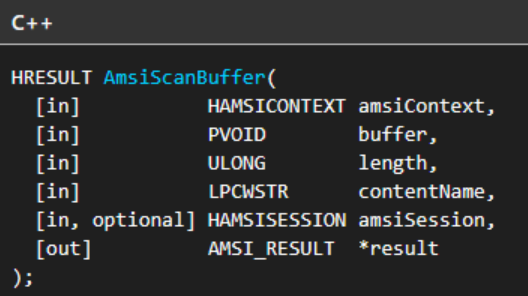
AmsiScanBuffer within amsi.dll.The detection result of the function is returned in the result parameter. This parameter takes a pointer to an AMSI_RESULT enumeration, which uses its four bytes of memory space to specify a range of values where each value or range characterizes a result type:
0(AMSI_RESULT_CLEAN): Per MSDN, indicates the content is known-good.1(AMSI_RESULT_NOT_DETECTED): Indicates the content was not detected as malicious, though it could be determined to be malicious in a future definition update.1 – 32767: Used as an estimated risk level by the antimalware provider, where a higher number indicates a greater likelihood of malicious content within the buffer.16384 – 20479(AMSI_RESULT_BLOCKED_BY_ADMIN_STARTtoAMSI_RESULT_BLOCKED_BY_ADMIN_END): Content within this range is blocked by policies set by an administrator.≥ 32768(AMSI_RESULT_DETECTED): Any value equal to or greater than32768is considered malicious.
We can verify these enumeration values directly within the amsi.h header file:
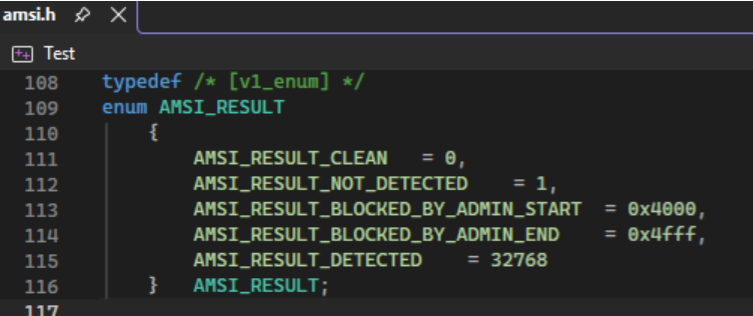
AMSI_RESULT enumeration values defined in amsi.h.AmsiScanBuffer Implementation in PowerShell
Using PowerShell as an implementation example, the runtime wraps AmsiScanBuffer inside a helper function that is called to scan each script block prior to execution by the interpreter.
First, AmsiScanBuffer is wrapped by the WinScanContent function within the AmsiUtils class of the System.Management.Automation security namespace. Notably, the result variable is initialized to AMSI_RESULT_CLEAN (0) on line 1449. As we will show in the demonstration below, this initialization is what makes this bypass technique possible.
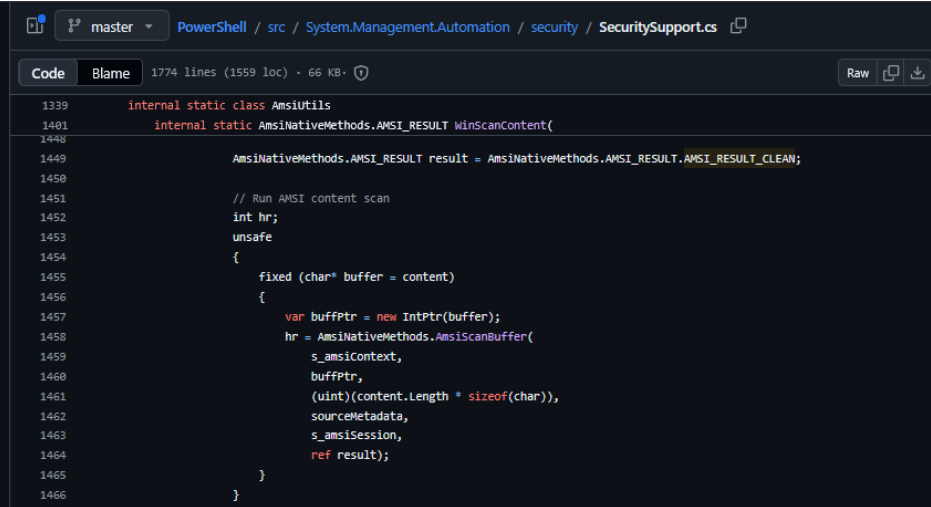
WinScanContent wrapper initializing result to AMSI_RESULT_CLEAN in SecuritySupport.cs.WinScanContent is then wrapped by the ScanContent function, which is called within the PerformSecurityChecks function of the CompiledScriptBlockData class inside System.Management.Automation. This architecture ensures PowerShell scans each script block for potentially malicious code prior to execution; if malicious code is detected, execution is terminated via an exception.
AmsiScanBuffer in Action
To see how AmsiScanBuffer operates under normal conditions, we can inspect the values returned in the AMSI_RESULT enumeration (located at memory address 0x0000005086B8EBB0 in our test dump) when scanning a benign command followed by a malicious command within the same PowerShell process:
- Benign Command (
whoami): Whenwhoamiis scanned byAmsiScanBuffer, a value of0x01(AMSI_RESULT_NOT_DETECTED) is written to the address ofAMSI_RESULT, allowing execution to proceed. - Malicious String (
Invoke-Mimikatz): ExecutingInvoke-Mimikatzin the same PowerShell process automatically triggers AMSI due to its signature as a PowerShell implementation of the credential-dumping tool Mimikatz. AMSI writes0x8000(32768, orAMSI_RESULT_DETECTED) toAMSI_RESULT, blocking the command.
Bypassing AMSI via the AmsiScanBuffer Patch
Because PowerShell initializes AMSI_RESULT to 0 (AMSI_RESULT_CLEAN) on line 1449 before calling AmsiScanBuffer, preventing AmsiScanBuffer from modifying that value causes PowerShell to treat the buffer as clean.
By patching the first three bytes of AmsiScanBuffer to set rax to 0 and immediately return, we accomplish two things:
- The caller function assumes the callee succeeded because
raxequals0, matching theS_OKsuccess return code ofAmsiScanBuffer. - The callee returns execution to the caller before the buffer is ever scanned.
Under these two conditions, the caller follows the control flow path for a successful scan returning AMSI_RESULT_CLEAN, allowing known-malicious script blocks to execute uninterrupted.
Demonstration
To test this behavior, we inspect the unpatched AmsiScanBuffer function within the memory space of amsi.dll loaded into a PowerShell process (PID 4032), then overwrite the first three bytes of the function with the following instructions:
xor rax, rax   ; Sets rax to 0, ensuring the caller receives S_OK
ret            ; Returns execution immediately before the buffer is scanned
Before applying the patch, running Invoke-Mimikatz in the PowerShell terminal returns an AMSI block error stating that the script contains malicious content. After patching AmsiScanBuffer and running Invoke-Mimikatz again, PowerShell instead throws a standard “The term ‘invoke-mimikatz’ is not recognized…” error. Because Invoke-Mimikatz is not a built-in cmdlet, receiving a command-not-found error confirms that AMSI scanning was bypassed and PowerShell attempted to execute the command.
Detection: Hunting AmsiScanBuffer Patching in Memory
In a live incident response scenario, suppose the SOC receives an alert titled Possible Anti-Malware Scan Interface (AMSI) Tampering. Security analysts can confirm and inspect the in-memory patch using PE-sieve to scan the target PowerShell process for anomalies, followed by Ghidra to disassemble the dumped module.
Step 1: Scan Process Memory with PE-sieve
Because overwriting the prologue of AmsiScanBuffer modifies executable code in memory, it can be identified as an inline hook. Running PE-sieve against PID 4032 with /iat 3 (the most aggressive import/hook scanning mode) detects modifications in two modules and dumps them to disk for analysis: clr.dll (a benign JIT-related false positive in this context) and amsi.dll.
Alongside each dumped DLL, PE-sieve generates a .tag file containing the relative virtual address (RVA) and byte size of every detected anomaly. In this capture, the modification in amsi.dll is flagged at an RVA offset of 0x8161 (33121 bytes) from the module base address 0x7FF86D260000, with a patch size of 3 bytes. We also recommend reviewing the scan and dump reports generated by PE-sieve, as they provide additional forensic context across other investigation scenarios:
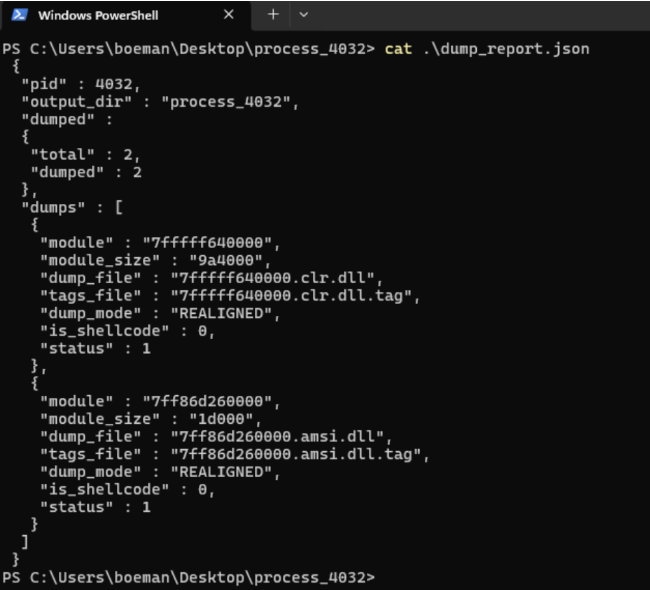
dump_report.json output showing dumped clr.dll and amsi.dll modules from PID 4032.Step 2: Verify the Patch in Ghidra
Next, load 7ff86d260000.amsi.dll into Ghidra. To jump directly to the tampered bytes identified by PE-sieve, add the RVA (0x8161) to the module base address (0x7FF86D260000):
0x7FF86D260000 + 0x8161 = 0x7FF86D268161Navigating to 0x7FF86D268161 in Ghidra’s disassembly view reveals the exact 3-byte xor rax, rax; ret patch at the entry point of AmsiScanBuffer that was injected via x64dbg during the demonstration.
Related Sentinel Blue Resources
To learn more about how Sentinel Blue’s Security Operations Center detects defense-evasion tradecraft and strengthens endpoint visibility across regulated environments, explore the following resources:
- Overwatch Security Operations Center (SOCaaS)
- eXtended Detection and Response (XDR)
- Incident Response Services
- Sentinel Blue SOC Insights
Authoritative References
- Microsoft Learn: Antimalware Scan Interface (AMSI)
- Microsoft Learn:
AmsiScanBufferFunction (amsi.h) - PE-sieve Memory Scanner (GitHub)
- Ghidra Software Reverse Engineering Framework